MinIO at Cloud Field Day 23: Four Key Takeaways for Enterprise IT

I’ll be honest – MinIO wasn’t initially at the top of my list of must-see presentations at Cloud Field Day 23. But recent conversations in the IT community around their decision to remove the web-based management UI from their Community Edition had piqued my interest. The move generated quite a bit of discussion about open source sustainability and commercial strategies, and I was curious to hear their side of the story.

My interest was also personal. A developer I knew indirectly had been working on an interesting proof of concept using MinIO to store and serve 3D models generated from scans of animal cadavers and organs for veterinary education. The project could require massive storage capacity for detailed anatomical models, and there was also a desire to pivot from using a SQL Server database to store smaller objects. It was exactly the kind of use case that showcases why object storage matters beyond simple file archiving – and why performance and scalability decisions have real-world implications for research and education.

What I got instead was a deep dive into AIStor, MinIO’s commercial offering that represents their evolution from a simple S3-compatible storage solution into what they’re positioning as a comprehensive AI data platform. AB Periasamy, Jason Nadeau, and Dil Radhakrishnan walked us through AIStor, their commercial offering designed specifically for AI and analytics workloads, complete with features I hadn’t expected to see from a storage vendor.

Here are the four key takeaways that stood out to me:

1. Object-Native vs. Gateway Storage: Why Architecture Matters for AI Workloads

Not gonna lie – when I first heard MinIO’s Jason Nadeau talk about “object-native architecture,” my initial reaction was “here we go with another vendor trying to differentiate their storage with fancy terminology.” But as he walked through the comparison between their approach and traditional object gateway solutions, it started making a lot more sense, especially for anyone who’s spent time dealing with the performance headaches that come from bolting new capabilities onto existing infrastructure.

The reality is many enterprise environments have been down this road before. Legacy SAN and NAS systems get extended and retrofitted for years because ripping and replacing storage infrastructure isn’t exactly a trivial decision. But what MinIO demonstrated is why that approach fundamentally doesn’t work when you’re talking about AI workloads that need to move massive amounts of data quickly and consistently. Their gateway-free, stateless, direct-attached architecture eliminates the translation layers that create bottlenecks – and anyone who’s ever tried to troubleshoot performance issues through multiple abstraction layers knows exactly what I’m talking about.

What makes this architectural difference even more compelling is how it enables features like PromptObject – AIStor’s ability to query unstructured data directly through the S3 API using natural language prompts. During Dil Radhakrishnan’s demo, you could literally ask a PDF or image to return structured JSON data without building complex RAG pipelines or maintaining separate vector databases. For known single-object queries, PromptObject removes the need for those components entirely—but it can also complement a RAG pipeline when broader inference or contextual chaining is required.

When AB Periasamy talked about deployments with more than 60,000 drives across multiple racks, all needing atomic operations across multiple drives simultaneously, it hit home why traditional storage architectures break down. AI training and inference demand a level of performance and consistency that wasn’t even on the radar when most current storage infrastructure was designed. And increasingly, they also demand the kind of intelligent interaction with data that PromptObject represents – turning storage from a passive repository into an active participant in AI workflows.

MinIO also demonstrated something called the Model Context Protocol (MCP) – which, frankly, sounds like yet another acronym to keep track of, but actually does something useful. It’s Anthropic’s spec that MinIO has adopted to let AI agents talk directly to storage systems. So instead of pulling data out, processing it somewhere else, and shoving it back, an AI agent can just ask MinIO to list buckets, tag objects, or even build dashboards on the fly. It’s the kind of direct integration that makes sense once you see it in action, even if the name makes it sound more complicated than it needs to be.

2. S3 Express API: What Amazon Learned About AI Storage Performance

AB Periasamy’s explanation of S3 Express was particularly interesting. Amazon’s decision to strip away certain features from their general-purpose API to optimize for AI workloads reveals where the real performance bottlenecks live.

The changes Amazon made tell a story about practical performance optimization. Getting rid of MD5 sum computations makes perfect sense – anyone who’s dealt with large file transfers knows that checksum calculation can be a significant CPU hit, especially when you’re talking about the massive datasets AI workloads require. Same goes for eliminating directory sorting on list operations. When you’re dealing with billions of objects, sorting is just a waste of compute resources that AI applications don’t actually need.

What’s particularly interesting from an enterprise IT perspective is that MinIO implemented S3 Express compatibility in AIStor, giving you the choice between regular S3 API and S3 Express without requiring any data format changes. You can literally restart the server and switch between APIs. That kind of flexibility is exactly what organizations need when they’re constantly balancing performance requirements with operational simplicity and budget constraints.

3. GPU Direct Storage: Why Your CPU is the New Bottleneck

Here’s something that really made me rethink how modern compute infrastructure should be architected: AB’s explanation of how GPUs have become the main processor and CPUs have essentially become co-processors for AI workloads. For those of us who’ve spent years optimizing CPU and memory utilization, this represents a significant architectural shift.

The bottleneck isn’t the GPU processing power – it’s how fast you can get data to the GPU memory. Traditional architectures require data to flow from storage through the CPU and system memory before reaching the GPU, creating a chokepoint that limits the performance of expensive GPU hardware. GPU Direct Storage bypasses all that by using RDMA to move data directly from storage to GPU memory, with HTTP as the control plane and RDMA as the data channel.


What caught my attention during the Q&A was the practical implementation details. You need Mellanox ConnectX-5 or newer network cards, and there are real trade-offs around encryption (you basically lose the RDMA performance benefits if you need to decrypt on the client side). These are the kinds of infrastructure requirements that need to be planned for now if organizations are serious about supporting AI workloads. The performance gains are significant, but you’re looking at specific hardware requirements and architectural decisions that affect entire network fabrics.

4. From 30PB to 50PB Overnight: Scaling Storage for AI at Enterprise Scale

One of the most eye-opening parts of the presentation was hearing about real customer deployments – like the fintech client that scales from 30 petabytes to 50 petabytes based on market volatility, or the autonomous vehicle manufacturer storing over an exabyte of data. These aren’t theoretical use cases; these are production environments dealing with the kind of explosive data growth that keeps storage administrators up at night (and honestly, makes me grateful for our more modest data growth challenges).

What really resonated was the discussion around failure planning. MinIO built AIStor with erasure coding parity levels of eight, assuming your hardware will break and plans accordingly. In environments where equipment often runs longer than ideal due to budget constraints (I once maintained a set of IBM servers nearly a decade past their initial warranty), this kind of resilience planning is crucial. When you’re talking about exabyte-scale deployments, hardware failure isn’t a possibility – it’s a constant reality.

The implications for higher education are significant. Research institutions are increasingly dealing with AI and machine learning workloads that generate massive datasets. The traditional approach of scaling up conventional storage solutions isn’t going to cut it when a single research project can generate petabytes of data. Organizations need to start thinking about storage infrastructure that’s designed from the ground up for these workloads, not retrofitted to handle them.

Final Thoughts

What struck me most about MinIO’s presentation was AB Periasamy’s technical candor and depth of knowledge. This was my second experience at a Tech Field Day event where I found myself genuinely impressed by a CEO’s ability to dive into the technical weeds and provide substantive answers to challenging delegate questions. AB didn’t shy away from discussing the limitations and trade-offs of their approach – whether it was acknowledging the encryption challenges with GPU Direct Storage or explaining why certain hardware requirements are non-negotiable.

The removal of the Community Edition GUI, which initially brought MinIO to my attention for this event, makes more sense in the context of their broader strategy. They’re clearly betting that the future of storage isn’t about pretty management interfaces, but about APIs, automation, and intelligent data interaction. Whether that bet pays off remains to be seen, but their technical approach to solving real AI infrastructure challenges is compelling.

For organizations serious about AI workloads, MinIO’s AIStor represents a thoughtful approach to the storage infrastructure challenges that traditional vendors are still trying to solve by bolting AI capabilities onto legacy architectures. The question isn’t whether AI will transform how we think about storage – it’s whether we’ll build infrastructure designed for that transformation, or continue retrofitting solutions that were never meant for these workloads.


To watch all the videos of MinIO’s presentations at Cloud Field Day 23, head over to Tech Field Day’s site.

 

Scality at Cloud Field Day 23: When Petabytes Feel Predictable – Operational Lessons

Enterprise storage vendors love to talk about exabyte scale, AI readiness, and multi-cloud vision. But as someone who’s spent the better part of 30 years in operations—across SANs, NAS, cloud, and everything in between—I tend to filter that hype through a much simpler lens:

“Will this thing work when it matters?”

Scality presented at Cloud Field Day 23, and what stood out wasn’t just the scale of their deployments—it was the quiet operational sanity behind them. Sure, there was impressive performance and architectural flexibility, but what really caught my attention were five practical takeaways that don’t always make it into press releases or analyst write-ups.

Much of that clarity came from Scality CTO and co-founder Giorgio Regni, who didn’t just walk through architecture slides—he gave us a window into how RING behaves in production, with customers operating at truly massive scale.

Let’s dig into the details.

IT Admins Feel at Home—Because RING Admins Like AWS

I’ve seen my share of S3-compatible storage systems over the years. Most of them focus on API compatibility, but few actually try to feel like AWS when you’re managing them. Scality RING does.

When they say “you can administer RING like AWS,” they mean it. IAM, users, policies, roles—it’s all modeled on the AWS way of thinking. That means if your ops team knows how to manage buckets in AWS, they’re already 80% of the way toward managing a RING deployment. No translation layer required. No re-education. Just clean, intuitive administrative patterns that make sense at scale.

This isn’t an accident. Giorgio specifically emphasized how important this was to their design. Multi-tenancy, usage tracking, and S3-compatible policy enforcement were all baked into the system because, as he put it, “Our customers want to build their customers—internal or external.”

That sounds like cloud, because it is.

CORE5: A Marketing Name Worth Keeping

Scality doesn’t just do object lock, encryption, and erasure coding—they’ve bundled these and other operational guardrails into a framework they call CORE5. I normally roll my eyes at product naming exercises, but this one stuck.

CORE5, as Scality frames it, covers five distinct layers of cyber resilience:

  1. API-level resilience – S3 Object Lock is enforced at the moment of object creation, ensuring data is immutable and protected from ransomware or accidental deletion.
  2. Data-level resilience – Fine-grained IAM controls, zero-trust architecture, and AES-256 encryption help prevent unauthorized access or exfiltration—even at scale.
  3. Storage-level resilience – Distributed erasure coding slices and scatters data across nodes, making it indecipherable to attackers—even if they gain root access.
  4. Geographic resilience – Multi-site replication ensures data survives regional disasters or breaches without sacrificing availability.
  5. Architectural resilience – The platform is fundamentally immutable; even with elevated privileges, it resists overwrites and tampering by design.

It’s a checklist that speaks directly to storage and security teams—people who live in the world of audits, recovery points, and “what if” drills.

Giorgio didn’t spend long on branding, but the features behind CORE5 came up repeatedly in his examples—especially immutability, replication, and the ability to absorb drive failures without blinking. In his words: “At least 10 drives fail every day across our customer base. The system doesn’t care. It just heals.”

That’s the kind of design mindset that shows respect for ops teams.

75% Cost Reduction Isn’t Just About Hardware

Cost reduction stories are everywhere, but the 75% figure quoted in the Euro bank deployment wasn’t just about cheap disks or high density. It was the cumulative result of architectural and operational choices:

  • Immutable buckets replace complex backup regimes.
  • Lifecycle policies eliminate cold data hoarding.
  • Disaggregated scaling means you don’t have to oversize any one tier.

That’s the kind of systems thinking I appreciate—not “buy fewer drives,” but “manage data better across its lifespan.” And yes, that includes offloading to tape without your end users ever noticing.

Giorgio added useful context here too: their customers don’t just build for scale—they evolve into it. One bank started with just 1PB and now manages 100PB across six global regions. That’s not a forklift upgrade. That’s operational confidence.

Cold Data Still Matters—Just Don’t Make Ops Pay For It

One of my favorite things about the CNES space agency deployment was that it brought tape back without apology. Scality’s RING integrates with HSM partners (like HP, Atempo, IBM) via an open API called TLP, letting archived data move off to tape while leaving metadata stubs behind in RING.

The result: your apps still talk S3, but your infrastructure quietly shifts that 15-year-old satellite image from spinning disk to tape. The operations team isn’t stuck managing separate namespaces, writing custom scripts, or reverse-engineering archival policies. It’s transparent, policy-driven, and reversible if needed.

Giorgio’s team even replicated AWS’s Glacier-style retrieval behavior—right down to pending status and asynchronous notifications. But unlike Glacier, there’s no egress charge or hidden penalty. It’s your data, on your terms.

This isn’t just “S3-compatible.” It’s cold storage without cognitive overhead.

Reliability, Defined in Ops Terms: 5 Years Between Failures Over 5 Minutes

MTBF numbers are usually abstract, but Scality’s framing was refreshingly direct: across their customer base, the average time between service interruptions lasting more than five minutes is five years.

That’s not just marketing spin. That’s how you measure uptime when you’re responsible for real people using real applications in real-world systems. It’s not about failure-free hardware—it’s about failure-tolerant architecture. RING’s peer-to-peer foundation and automated healing clearly contribute, but more important is that the whole system seems designed to reduce drama, not just increase speed.

As Giorgio put it: “We get one event every five years. That’s the number I care about.”

In an age where we’re constantly told to expect failure and design around it, Scality is saying, “Sure. And also—we’ll try not to wake you up for it.”

Closing Thoughts

It’s easy to get swept up in the big numbers: trillions of objects, exabytes of data, petabytes per day of ingest. But what I took away from Scality’s presentation—especially Giorgio’s portion—is this:

Operational success at scale isn’t just about performance. It’s about predictability.

And that’s something RING seems to deliver—not just to hyperscalers, but to the banks, governments, and researchers quietly building the infrastructure behind the infrastructure.

It might not be sexy. But it works. And that still matters.

To watch all the videos of Scality’s presentations at Cloud Field Day 23, head over to Tech Field Day’s site.

Cloud Rewind at Cloud Field Day 23: Resilience as Code, Without the Ritual

At Cloud Field Day 23, I sat in on Commvault’s presentation of their Cloud Rewind solution—formerly Appranix—and I’ll admit, I came in skeptical. I’ve been doing ops and architecture work for nearly three decades, and I’ve seen a lot of “reinvented” DR solutions that promise to reduce downtime, complexity, and cost. But most of them just swap one kind of management overhead for another.

Cloud Rewind felt different. Not just because of the marketing (though there was plenty of that), but because the architecture—and the intent behind it—actually addressed some very real problems I’ve experienced firsthand.

Rethinking DR for the Cloud-Native World

The central problem Commvault tackled here is that most cloud environments today are too dynamic, too distributed, and frankly, too chaotic for traditional DR approaches to keep up. The Commvault team walked through a production AWS deployment spanning multiple availability zones, with a massive sprawl of RDS instances, load balancers, and ephemeral services—exactly the kind of complexity that keeps cloud architects up at night.

In environments like that, idle recovery setups—the standard disaster recovery standby—aren’t just wasteful. They drift. They rot. And in a ransomware event, they’re often just as compromised as production. The Commvault team flat-out said it: “Idle recovery environments drift away from production.” That alone should make any ops lead pause.

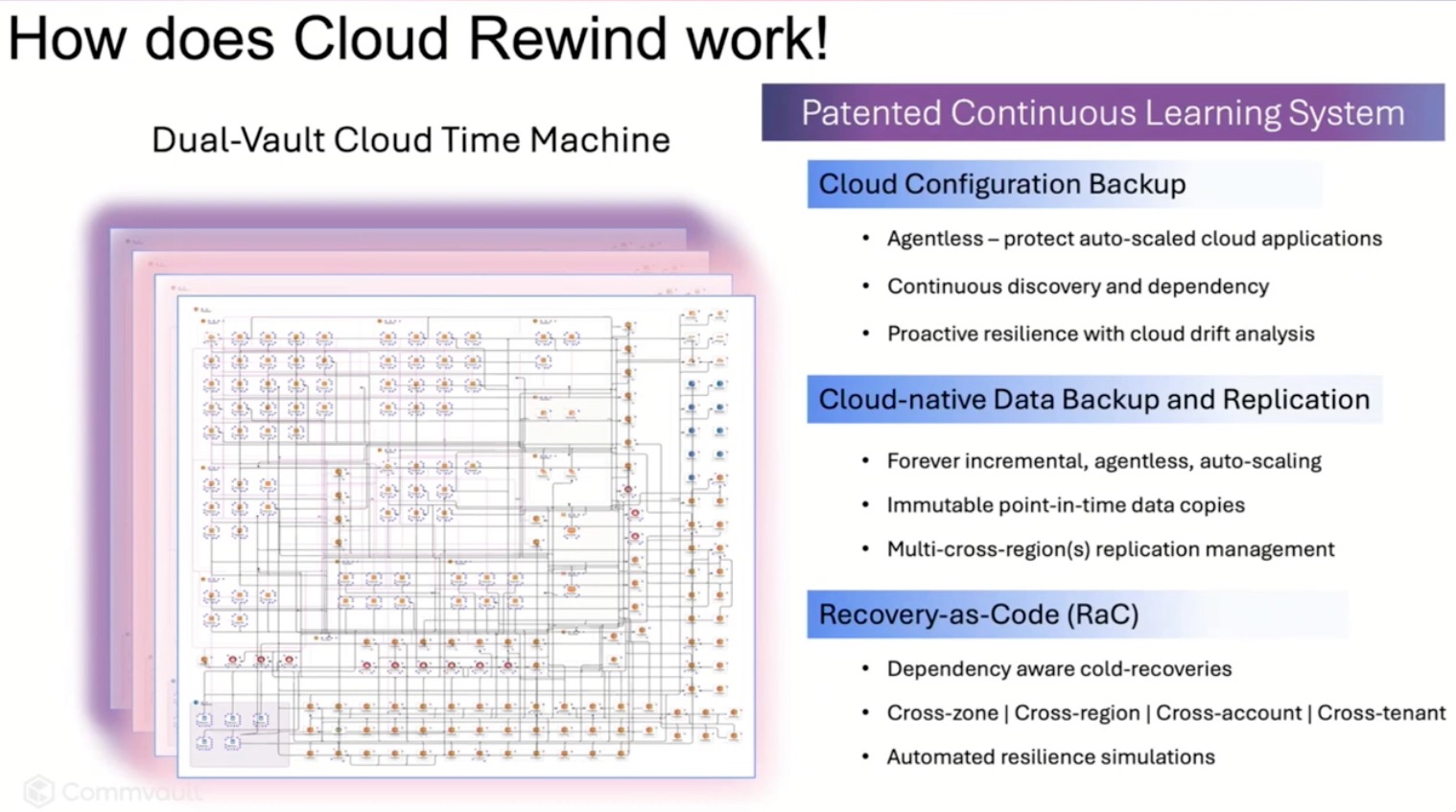
Cloud Rewind’s answer is to automate recovery from the inside out. Think of it as recovery-as-code, with snapshots of not just data, but also configurations, infrastructure dependencies, and policies. It’s not Terraform (though they integrate with it), and it’s not just backup—it’s a “cloud time machine” that builds you a clean room environment from known-good states and then lets you decide how, when, and where to cut back over to production.

They call this approach “Recovery Escort”—an odd name, honestly, but a great idea. Instead of juggling team-specific runbooks in the middle of a crisis, Cloud Rewind creates a single, orchestrated, infrastructure-as-code-based recovery plan. One workflow. One click. Done. And it’s not a copy-paste of yesterday’s environment—it uses continuous discovery to track configuration and application drift so you’re always recovering to something real. That’s what impressed me most: they’re not assuming your documentation is up to date. They know it isn’t, and they’re building around that.

CFD CloudRewind.

Security and Simplicity in Tandem

One feature that stood out—especially with ransomware scenarios top of mind—was their support for what they call Cleanroom Recovery. You can spin up an isolated clone of your environment, run scans, validate app behavior, and confirm you’re not just recovering the malware along with the data. That level of forensic flexibility isn’t just a nice-to-have; it’s a practical necessity. Because the minute you cut back over, you want confidence that what you’ve recovered is actually usable—and uncompromised.

And the broader idea here is that DR shouldn’t be an awkward ritual. Most tooling assumes recovery is rare, complex, and terrifying—something you test once a year (maybe) and dread every time. But Cloud Rewind flips that: what if recovery were fast enough to test weekly? What if it were just part of your CI/CD pipeline? One customer story shared claimed recovery tests that used to take three days and dozens of people now complete in 32 minutes. If true, that’s awesome. That’s the kind of muscle memory every cloud org needs—and the only way to get there is through automation.
Final Thoughts

I’ve spent much of my career trying to protect environments that I could barely map out on a whiteboard. Cloud Rewind feels like a tool built by people who’ve lived that pain. Is it perfect? No. Does it still feel like a premium play? Sure. But if you care about recovery time, reproducibility, or even just reducing the number of sleepless nights when your phone buzzes at 2am, this is worth a serious look.

There’s a lot more under the hood than I’ve captured here—cross-region replication, policy-based orchestration, integration with AWS and Azure backup tools—but the big takeaway is this: Cloud Rewind shifts DR from a fire drill to a workflow. And that’s exactly the kind of evolution cloud resilience needs.

My one regret about this session? The delegates were so engaged, digging into details, that we ran out the clock before the live demo could be run. Tim Zonca from Commvault did offer to arrange a demo for those interested at another time. I might just take him up on that.

To watch the video of the #CFD23 presentation by Commvault on Cloud Rewind, go to the Tech Field Day’s YouTube channel.

Clumio at Cloud Field Day 23: Backups That Belong in the Cloud – But Not Too Close

I’ve long believed that backup isn’t just a checkbox—it’s a strategy. So when Clumio took the virtual stage at Cloud Field Day 23, I was curious to see how a backup-as-a-service vendor could stand out in a space where “cloud-native” is often more branding than architecture. What I saw was a team leaning hard into the AWS ecosystem—not just running on AWS, but with it, using native services like EventBridge and Lambda to build a scalable, serverless platform designed for automation.

Clumio, acquired by Commvault in 2024, now serves as the cloud-native backbone of Commvault’s broader data protection strategy. It’s their answer for teams that live inside AWS and don’t want to manage backup infrastructure—but still need performance, isolation, and scale.

Clumio isn’t trying to reinvent backup. It’s not asking you to forklift your data to some third-party silo or wrap agents around every workload you touch. Instead, it’s offering a clean and efficient way to protect AWS-native data, from S3 and EBS to DynamoDB and RDS, without managing infrastructure, hardware, or even backup windows.

What makes Clumio interesting isn’t just that it backs up your cloud—it’s how it separates your backups from your primary environment without leaving the cloud. That “logical air gap” model, paired with strong performance claims and aggressive pricing, adds up to a platform that doesn’t try to be everything—but does a few critical things very well.

Air Gaps, Automation, and Architecture That Makes Sense

Clumio’s “logical air gap” is a key part of its security and resilience story. Your backups live in a completely separate AWS account, managed by Clumio, dedicated to your organization, and inaccessible without explicit authorization. It’s not a physical gap—this isn’t the old-school offline tape model—but it is real isolation. A compromised IAM role in your production account doesn’t give attackers access to your backup data.

What’s especially compelling is how Clumio achieves this without requiring agents, proxies, or any backup infrastructure in your account. After an initial CloudFormation or Terraform deployment, everything else runs on Clumio’s side—fully serverless, driven by EventBridge, and orchestrated with Lambda. It’s a clean, automated pipeline that’s responsive to changes and designed to scale without babysitting.

This isn’t just about elegance. It’s about reducing operational overhead for teams already stretched thin. And Clumio backs that up with a support model that resolves 95–98% of tickets proactively, before most users even know there’s a problem. The platform is engineered for invisibility in the best way—hands-off, API-driven, and infrastructure-free.

CFD23 Clumio vs Native.

Granularity, Performance, and Real-World Outcomes

Clumio’s flexibility comes into sharper focus when you look at how it handles S3 and DynamoDB. For S3, protection groups allow you to define exactly what gets backed up—by tag, prefix, region, or any combination thereof. Instead of duplicating entire multi-purpose buckets, you can target the slice that matters, which helps with both cost and compliance.

DynamoDB protection is table-level, and leverages streams for incremental capture. That’s a big win over full-table snapshots—especially for large, high-throughput environments—because it means lower cost, shorter RPOs, and faster restores.

And the numbers? They’re hard to ignore:

  • 100M object restore in 9 hours, compared to 3 days with AWS-native tools.
  • 50+ billion object support per bucket, well above AWS’s 7.5B limit.
  • Sub-hour RPOs thanks to continuous change tracking.

Case studies bring those claims into focus. Atlassian dropped their RTO from 248 days to under 2, and cut costs by 70%. Duolingo saved over $1M annually on DynamoDB backup while increasing retention from 7 to 30 dailies. These aren’t marginal gains. They’re systemic improvements—both in speed and economics.

CFD23 Clumio Duolingo.

Pricing and the Big Picture

Clumio’s pricing is refreshingly straightforward: $0.025 per GB per month (front-end backup size), plus $1.50 per million objects managed. Restore and cross-region transfer costs apply only during recovery. Air-gapped storage comes standard—no extra fees, no extra knobs to turn.

The takeaway? Clumio isn’t trying to do everything. It’s built for AWS customers who want native integration, automation without the overhead, and real control over their backup data. You won’t find support for Azure or GCP (yet), and it doesn’t pretend to be a legacy replacement for every use case. What it does do is give you a scalable, secure, efficient way to back up and restore critical AWS services without dragging along the complexity of traditional platforms.

That said, no matter how invisible or “set and forget” the platform seems, you still need to care about your backup strategy. Automation is only as good as your observability and validation practices. But if you’re all-in on AWS and still leaning on snapshots and lifecycle policies, Clumio is worth a serious look.

To watch the video of the #CFD23 presentation by Commvault on Clumio, go to the Tech Field Day’s YouTube channel.

Qumulo at Cloud Field Day 23: DR Without the Drama

I’ve been in this industry long enough to have seen disaster recovery run the full spectrum—from fire drills that barely worked to full-on game changers. And at Cloud Field Day 23, Qumulo laid out a vision for business continuity that might just live up to the hype. Not because it’s flashy, but because it’s practical. DR that works without being the most expensive line item in your budget? That got my attention.

Let’s break it down.

No More Stretching the Truth About Stretch Clusters

Most of us have been sold the dream of active-active systems with full failover and zero downtime. And then reality sets in. You either pay double to stand up a hot standby that sits idle most of the year—or you roll the dice and hope your last backup isn’t too stale when it counts.

Qumulo’s take? Don’t replicate everything twice. Instead, park your data in cold cloud storage like Glacier Instant Retrieval or Azure Blob Cold, where the cost per terabyte actually makes CFOs smile. Then, scale up compute on demand only when you need it. We’re talking cold to hot in under five minutes—no data rehydration, no DNS voodoo, no long restore windows.

Qumulo Instant Hot DR

And here’s where it gets really interesting: Qumulo isn’t just minimizing costs—they’re actively engineering out inefficiencies. One customer faced $800,000 in projected API charges moving medical images into a vendor-neutral archive. Qumulo helped them reduce that to just $180. The magic wasn’t in waving away the cost—it came from bin-packing files to minimize object write operations and optimizing how data interacted with the storage backend.

On top of that, Qumulo’s neural cache plays a significant role in controlling read-heavy workloads. By maintaining 92–98% read cache hit rates and adapting caching strategies based on usage patterns, file types, and directory behavior, they slash repeat API calls that would otherwise nickel-and-dime you into oblivion. Their global fleet averages less than 1% of monthly cost from API charges, compared to 15–20% that’s typical for cloud object storage.

Now, are those numbers a best-case scenario? Almost certainly. And I’m always skeptical of dramatic cost-saving claims until I can get hands-on and validate them in a real environment. But what’s undeniable is that Qumulo is hyper-optimizing their platform not just for performance, but to respect the economics of running file workloads in the cloud. That’s more than most vendors even try to do.

Real-Time DR You Can Actually Test (And Should)

One line from the presentation stuck with me: “We’ve never tested our DR because if I take down production to do it, that’s a resume-generating event.” If you’ve worked in ops, you’ve heard this. Or maybe you’ve said it.

Qumulo’s approach flips the model. Their system continuously replicates data block-by-block between your on-prem caching layer and a cloud-native backend. The cache stays local for performance, but the cloud holds the authoritative copy. That means you can spin down your on-prem environment, move employees to another site—or just hand them a fully capable Asus NUC—and keep working like nothing happened.

During the demo, they showed a failover that was basically “stop using this SMB share, start using this one.” Same data, same structure, same IP. Even the mount point didn’t change. No rehydration, no scrambling to resync state. It just worked.

Data Fabric That’s More Than a Buzzword

Every vendor talks about their data fabric. Qumulo actually showed one.

They connected an on-prem environment to a cloud-native Qumulo instance using a “data portal”—think block-level streaming replication, not dumb file copies. Clients didn’t have to know the cloud existed. Then they moved data, edited a file, failed over, failed back, and showed full consistency end to end. And if you’re thinking, “What about edge or third-party access?”—yep, that’s built in too. They demoed extending read-write access to an external partner with full revocation and audit.

Even better, this wasn’t just DR—it was a multi-cloud-ready setup with file, object, and cloud compute playing nice together. AWS, Azure, GCP—pick your flavor. The system doesn’t care.

Where the Data Lives (And Who Uses It)

In the CEO’s opening segment, we got a better sense of just who’s using Qumulo. Turns out, it’s everyone from entertainment studios rendering animated characters your kids know by name, to healthcare researchers storing medical imaging and genomic datasets. The claim that “we’re storing the cure for cancer on a Qumulo system” might sound dramatic—but they meant it literally, with NIH and NSF grant recipients relying on their storage to keep research data accessible and verifiable.

Want to know how real-time image processing supports public safety? Qumulo powers storage for real-time crime centers in major U.S. cities. They even shared a story about a high-profile presidential visit requiring instantaneous video ingest, analysis, and secure access for multiple agencies, including those that couldn’t legally use facial recognition software—while others could. Same data, different access paths, strict consistency guaranteed. 

They’re also serving defense agencies working with UAS/UAV video data and edge AI, and municipal governments managing CAD/GIS datasets for public works. One customer runs a single microscope generating 750 terabytes per week, streaming it to an AI cluster in Texas for medical research. That’s the scale we’re talking about.

Final Take

This wasn’t a pitch about replacing your on-prem hardware with another box. It was a strategy shift: DR that’s built into your primary system, not bolted on. Qumulo’s demo didn’t just show high availability—it showed recoverability that feels like high availability. And it did it with less infrastructure, less manual effort, and fewer “please don’t crash” prayers.

It’s business continuity without the drama. And frankly, it’s pretty cool.

Qumulo CFD23 Presenters

Here are links to the videos of the Qumulo presentation at Cloud Field Day 23 on the Tech Field Day Youtube channel:

Reimagining Data Management in a Hybrid-Cloud World with Qumulo

Seamless Business Continuity and Disaster Avoidance with Qumulo

Seamless Business Continuity and Disaster Avoidance: Multi-Cloud Demonstration Workflow with Qumulo

Cloud ERP on Your Terms: SAP, HPE GreenLake, and the Private Cloud Middle Ground

I participated this week as a delegate at Cloud Field Day 23, and one of the most candid sessions so far came from HPE GreenLake and SAP. The focus? SAP Cloud ERP – formerly known as RISE – and their joint approach to helping legacy SAP ERP customers make the leap to their private cloud platform.

An early slide (highlights mine) hit with a stat that landed harder than I expected: as of the end of 2024, only 39% of legacy SAP ERP customers had actually purchased S/4HANA licenses. That’s not migration complete—that’s just licenses purchased. And that is for a product that goes End of Support in 2027. For a platform as mission-critical and sprawling as SAP ERP, it’s not hard to see why inertia reigns.

SAP and HPE’s proposed answer for hesitant customers? A hybrid approach called Customer Data Center (CDC) private cloud ERP. Think of it as SAAS, but running in your data center, on HPE hardware, maintained by both SAP and HPE. Customers get cloud operations and SAP support continuity, while keeping their workloads and their data close to home. It’s designed to help customers avoid falling off the end-of-support cliff while buying time to transition on their terms.

The session also included a customer perspective from Energy Transfer, a US firm with 130,000 miles of pipeline in 44 states and one of the early adopters of this CDC model. They were refreshingly transparent. Yes, there were “sticks and carrots” involved in the decision, but the biggest carrot for them was the promise of access to Joule – SAP’s agentic AI platform. Joule is only available in SAP’s public SaaS offering or this private CDC model, making it a compelling draw. Energy Transfer’s non-negotiable condition? The transition had to be cost-neutral.

SAP also described how they structure their engagement model to support projects of this magnitude. Given how many ERP projects fail or flounder due to continuity issues, I asked a question during the session about team depth. Specifically, how do they manage institutional knowledge when key personnel inevitably move on? SAP’s response was pragmatic: their named project teams are regional, and roles are built with intentional overlap. Each team member is flanked by someone one level above and one level below who is looped in, to smooth transitions if (when) someone leaves. As someone who has had to step into the gap when colleagues take other opportunities and now manages a team, that struck me as both smart and necessary.

HPE and SAP didn’t shy away from the business reality underpinning all of this. The perpetual license model is dying, and subscription-based models are now the norm. While some customers still pine for the days of CapEx and perpetuals, HPE and SAP are incentivizing the move to recurring revenue models in a way that’s clearly designed to align better with how modern IT is financed and measured.

Bottom line? Public Cloud ERP isn’t one-size-fits-all, and by SAP’s admission isn’t ready for many of their complex and customized customer environments. This hybrid CDC approach acknowledges that reality. Not every enterprise is ready to go all-in on SaaS, and some may never be. SAP and HPE GreenLake seem to understand that, and the CDC model looks like a pragmatic (and carrot-laced) middle path.

My first Tech Field Day experience at AppDev Field Day 2 – Heroku

I was excited to be invited to participate as a delegate at AppDev Field Day 2 in Salt Lake City, running parallel to KubeCon + CloudNativeCon. Due to an unplanned bird collision, my flight was delayed, but I arrived in time to attend the Heroko presentation on day 1. I’d heard of Heroku way back in the day, and think I may have even tried their free tier back in their startup days before the Salesforce acquisition in 2011. But this was my first opportunity to learn about the company and its offerings first hand.

Heroku Presenters.


Heroku: Leave the DevOps to Us

Heroku’s value proposition to developers is that they can code and deploy their application without really needing to worry about all the infrastructure required to make it happen. Developers can focus on what they do best and trust that the team at Heroku will manage and maintain everything from containers to databases SSL certificates and more to keep the application running and scale it to meet demand. I can’t generalize about all developers because I don’t know them all, but almost all of the developers I’ve worked with across multiple organizations want to write code and push it to the environment on which their users will access it.

An Ops Pro Perspective

I’ve been on the operations side of things for nearly 28 years. So I was intrigued to learn more about Heroku and the cloud provider on which it runs.  When I asked that question, the presenter said they run on AWS. Heroku abstracts away the complexity of AWS infrastructure and presents it to the customer as a Dyno, which they call the “building blocks that power any Heroku app.”

I can hear my fellow sysadmins, even those of us who are called cloud architects these days, saying, “but couldn’t we just build that ourselves? Aren’t we paying a premium for this ‘as a service’ over and above whatever AWS would charge us for infrastructure?” I’m betting the answers to those questions are “maybe” and “probably” – but I gotta be blunt – both in my current role and given that my plate always has more being added to it, I’m not sure why I’d want to. I could build Windows Server VMs in Azure, setup IIS, and have our developers deploy apps to them as well, but I don’t. I manage App Services on App Service Plans and, more and more, I’m considering migrating to Azure Kubernetes Service. Whether I’m one of several architects in a large IT department or a single IT Pro working for a smaller company, I’d rather not have to deal with some of the lower level infrastructure if I don’t have to.

What’s Next for Heroku?

It seemed clear to me that, having pitched their platform primarily to developers since the beginning, Heroku is also tailoring their message to the operations side of the house. They’re clearly adopting open standards and, while the opinionated nature of their platform is a strength, they’ve done a lot of work to allow customers to integrate with other tools if one aspect or another of the Heroku platform isn’t a perfect fit.

Here are a couple of pics I snapped during the presentation. HTTP/2 ought to speed up websites running on Heroku, and speaking as someone who still deals with far too many manually provisioned SSL certificates, Heroku’s Automated Certficate Management feature supporting wildcard domains sounds fantastic. Let’s Encrypt made this possible for me on this blog back in 2018, and I still look forward to a day when I never have to worry about certificates again. 

Heroku whats coming.

Many of the apps my organization builds and maintains are written in .NET, so having support for it come to Heroku was a nice surprise. We have a bit of some of their other supported languages sprinkled around as well.

Heroku dotnet.


My first Tech Field Day

Not gonna lie – it was a bit intimidating sitting there with folks I’d previously only seen on the TFD streams. The experience was fantastic, though, and I enjoyed learning more about Heroku and offering feedback to them. I’ll be keeping an eye on them and look forward to hearing about any new annoucements they may have in the pipeline. 

First Road Trip in our Chevy Bolt EUV

Rachael wanted to go to Ruby Falls for Mother’s Day, so go to Ruby Falls we did. We decided to take our 2023 Chevy Bolt EUV on its first road trip outside of town, figuring the roughly 100 miles to Chattanooga from our home in Knoxville would allow us to test DC Fast Charging on the way home whether we really needed it or not.

The night before we left, I adjusted the charging settings on the Bolt from its normal 80% to 100%. I’ve read mixed opinions about whether limiting regular charging to 80% is necessary, or a good idea, but since we bought the Bolt with the expectation that it would primarily be our “around town” vehicle, with our 2022 Honda Accord Hybrid for long trips, charging to 80% is more than enough to handle our 2-3x / week commute of 50 miles. 

We’ve been driving pretty efficiently during the Spring months, and that’s helped our average miles per kWh rise to 4.3. Since we also drive primarily in town, with a mix of 60% highway and 40% main and side roads, I wasn’t surprised to see the Bolt’s Guess-o-Meter suggest we could drive more than 300 miles on this full charge. Chevy lists the range as 247 miles, and I’d say we typically beat that, especially since we’ve never needed to go more than 65 mph.

MD Trip Starting SOC.

My wife does nearly all the driving when we’re together, so on the way to Chattanooga I setup an account with Electrify America. I used A Better Route Planner on my iPhone to plan our route, and it was suggesting we stop on the way back at a Wal-Mart and use DC Fast Charging to get back to 78% in order to meet my configured goal of arriving home with 40% state of charge. That’s likely a bit too conservative, but until we have access to the Tesla SuperCharger network, conservatively is how I intend to plan our trips.

I also looked up Ruby Falls in PlugShare and it told me there were two Blink Level 2 chargers in the parking lot. I’ve seen Blink chargers all over in other cities and states, including a city in Alabama where we visit family, so I signed up for a Blink account as well. I noted that the price for Blink charging at that location would be $0.02 per 30 seconds for a member or $0.04 per 30 seconds for a guest, so if we charged for 90 minutes, it would cost $3.60. When we arrived at Ruby Falls, we parked at at the charger rated for 8.3 kW instead of the one rated for 6.x. One mildly annoying thing is that I had to “charge up” my Blink account with a minimum deposit of $20, kinda like a toll beacon, and allow the charger to pull from it. I’m sure Blink prefers to have money sitting in customer accounts, and as a bit of foreshadowing, this likely saved them a second credit card charge from me later in the day.

When we left the Bolt, it was sitting at 61% charge and considering we’d driven the entire way on the interstate at 68 mph, the car estimated we had another 171 miles left. I figured that was pretty good considering some of that driving was up a mountain.

MD Trip RF Arrival.

Here are the details of our first charge of the day. We’d headed back to the car to leave our jackets and photos we’d purchased in the car and as we approached the vehicle, I was notified our Bolt had hit 85% charge. Blink also notified me it was time to move, or that I’d be charged to stay there. The parking lot was full other than the charging stations and we’d decided to let our son do the zip line and rock climbing, so I changed the charging settings on the Bolt to allow it to go to 100% and started a new session.

After the zip line and rock climbing, we returned to our vehicle. The first thing we noticed was this large ICE truck parked in the other Blink charging spot. Not cool, especially since there is a sign saying those spots are for EV charging. 

MD Trip NotNice.

Our second charging session brought the Bolt’s battery to 100%. Notice the drop in estimated range to 291 from 319 at home that morning. I don’t put a lock of stock in the Bolt’s abiity to estimate range, which is kinda sad because our Honda Accord Hybrid does a pretty good job of it. Still, it isn’t like we run either vehicle down to E before “refueling” – be it with electrons or gas.

MD Trip Ruby Full.

Here are the details of the second shorter charging session from Blink. For a combined 27.6 kWh, that brought our total amount for going from 61% to 100% to $8.76, or 32c per kWh.  That’s the cost of around 2.5 gallons of gas, and about what our hybrid would cost to drive to make that leg of the trip. So for “slow” Level 2 charging, it looks like I paid about what I’d pay to drive my hybrid. Where the savings really come in are on the first leg of the trip, as we pay roughly 11c per kWh to charge at home. To be fair, if I’d been willing to give it a shot, I’m sure we could’ve made the trip back home without charging, but I wanted to try out Blink and given that EV chargers aren’t as ubiquitous as gas stations, I’m not quite ready to run that close to the wire. I’m curious to see what DC Fast Charging costs, but I assume it will be more expensive than 32c per kWh.

After a side trip out of the way for lunch in Chattanooga, a truly terrible meal at Sticky Fingers, and another side trip to get some ice cream at one of our favorite spots in Loudon, Tic-Toc, we made it home. Total distance driven was 203 miles and we used just a tad more battery capacity come back as going down, which makes sense as it was warmer and we ran the AC the whole way.

MD Trip Back Home SOC.

All in all, I enjoyed our first road trip in our EV. Next time, I plan to take it to Nashville or Huntsville to visit family and experiment with DC Fast Charging. 

And to wrap things up, here’s a pic of us in front of the falls inside the cave at Ruby Falls.

MD Trip Falls.

Setting Up Let’s Encrypt on an Azure App Service

Once I had my blog ported over to WordPress running as an Azure App Service, I knew I needed to figure out how to secure my site, both because I wouldn’t want to be logging into it, randomized unique password or not, and because I wanted to be a good web citizen and secure all the things.

I saw that my pal Jeramiah had used Let’s Encrypt to secure his site, so I did some Googling, and asked him if he’d used the Azure extension I’d seen mentioned in a few blog posts, and he confirmed he had.

I read a few guides on getting it done, and while I had a few issues along the way, I finally got everything working. In an effort to save people from the starting and stopping and Googling that I had to go through while working through it, I decided to document the entire process from start to finish on a fresh blog.

You’re going to need an Azure Storage Account

Once you’re logged into the Azure portal, look for Storage accounts on the left-hand menu.

Azure Storage Account 1

As you can see here, I have no storage accounts. Click Create storage account.

Azure Storage Account 2

You’ll need to fill out and select some options here. I like to name every account or aspect of an App Service based on the overall name of the App Service, so I went with geekfoodblog.

I left Resource Manager as the default, selected general purpose v1, located in East US, and selected Geo-redundant storage (GRS). That may be overkill for my needs, but based on the storage costs for this blog last month and the amount of MSDN credit I have, it’s moot.

I believe Secure transfer required was Disabled by default, and I left it that way. If you have more than one subscription, you can select that here.

I did choose to drop it into the existing geekfoodblog Resource Group, since I had already deployed WordPress as an App Service before setting up Let’s Encrypt.

I did not choose to configure  virtual networks, nor did I pin this account to my dashboard, and with that, I clicked Create.

Azure Storage Account 3

Click on Access keys and copy your primary Connection String into a secure note somewhere for later use.

Azure Storage Account 4

Now you need a Service Account (or App Registration)

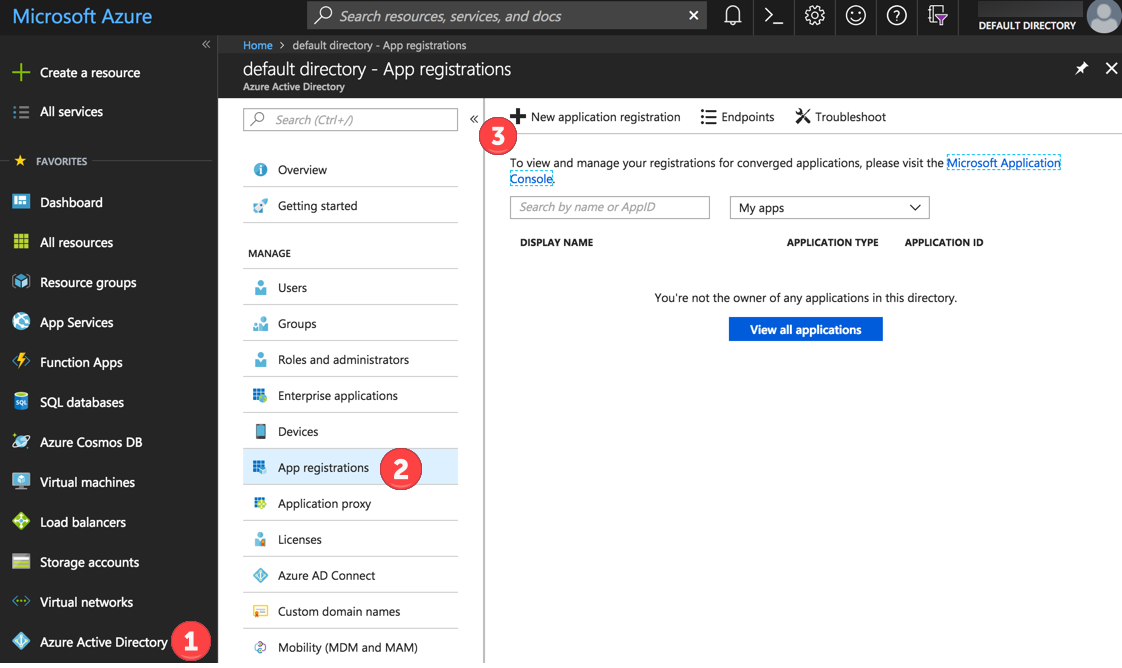
You may see this referred to elsewhere as a Service Principal. Azure calls it an App Registration. So click on Azure Active Directory, then App registrations, and then New application registration.

Azure Service Principal 1

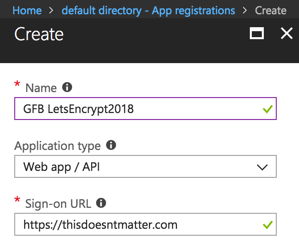
You can see how I named mine. You’ll make use of auto-complete later, so using a few memorable letters as a prefix helps.

Also, as noted below, the Sign-on URL doesn’t matter in the sense that it doesn’t have to be something you own or are working with, but it does has to be something that is recognized as a legitimate URL.

Azure Service Principal 2

Now you’ll need to create a client secret or key.  Click Settings, then Keys.

Azure Service Principal 3

Give your key a description – I used letsencrypt, and I selected Never expires as the duration. That’s probably terrible, but it’s a huge key, so sue me.

When you click Save, you will be warned to copy the key value, as you won’t be able to retrieve it later. Stick that in the same secure note with your Storage Account connection string from above.

Azure Service Principal 4

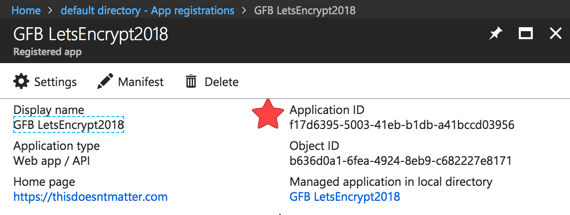
You’ll also want to copy and paste the Client ID of your Service Account / App Registration.

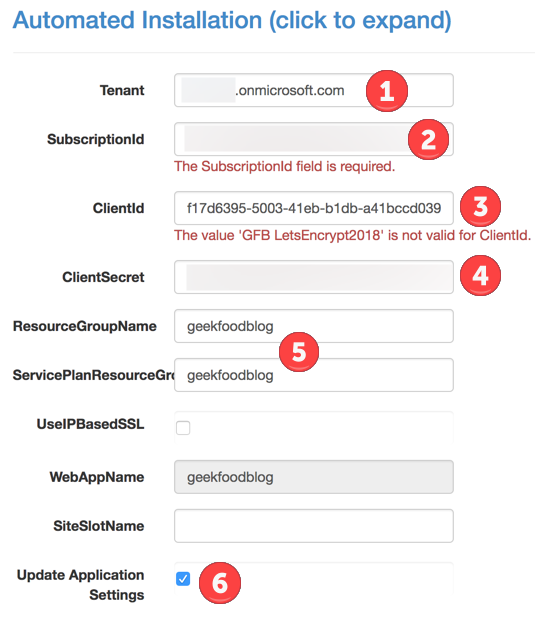
As you can see below, and as you’ll notice in the screenshot I saved with the Client ID error I left in, the Client ID is not what you named the App Registration, but rather the Application ID.

You can copy and paste this into your secure note, or you can go grab it later as I did.

App Registration App-Client ID

Time to assign permissions for your Resource Group to your Service Account

Now you need to make sure your Service Account has permissions to your Resource Group, in particular so it can access the Storage Account you created above.

Click on Resource groups, then on the Resource Group of which your Storage Account is a member.

Azure Service Principal 5

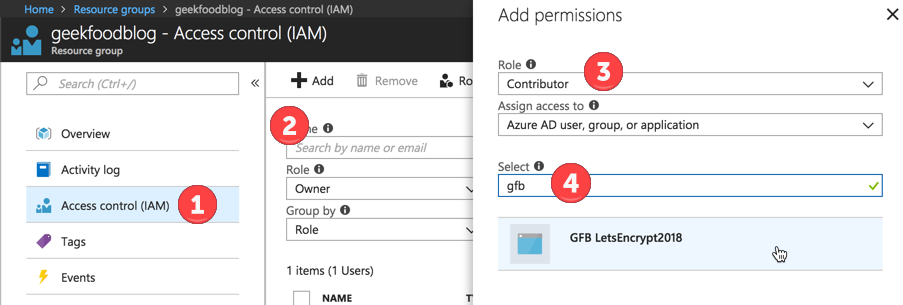
Click on Access control (IAM), then click Add. For Role, select Contributor.

Start entering the name of your Service Account in the Select field, and select it, then click Save.

Azure Service Principal 6

Azure Service Principal 7

Now let’s install the Let’s Encrypt Extension

But first, so you can avoid an issue I noticed when I first set this up, let’s ensure your App Service is configured to always be on.

Click on App Services, then click on your App Service.

Azure Extension 1

Now click on Application Settings, and scroll down to Always On and make sure it is set to On.

Mine was not for some reason, and I noticed an error at one point.

Azure Extension 2

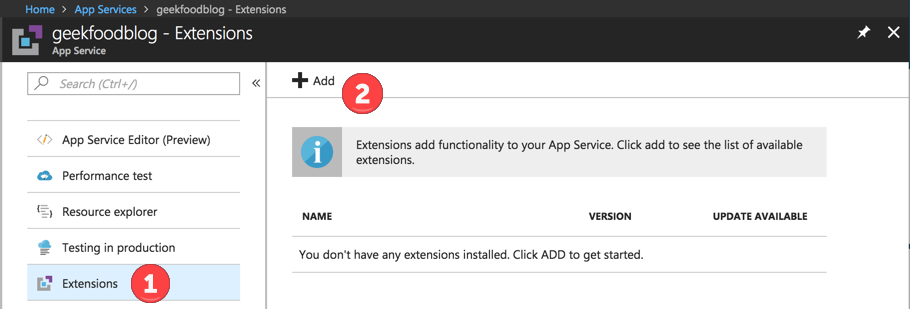
Now click on Extensions, then Add.

Azure Extension 3

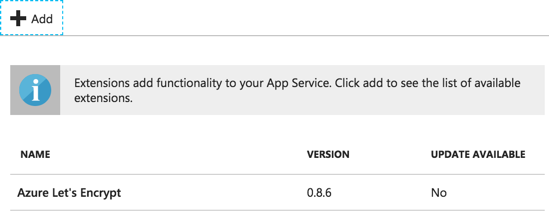
Look for Azure Let’s Encrypt by SJKP. Click on it, then OK to accept legal terms, then OK again.

Azure Extension 4

Before proceeding, to help you avoid an issue I’ll show with a screenshot later, go ahead and restart your App Service.

Scroll up to click Overview, then click Restart. Then scroll back to and click Extensions.

Restart Service

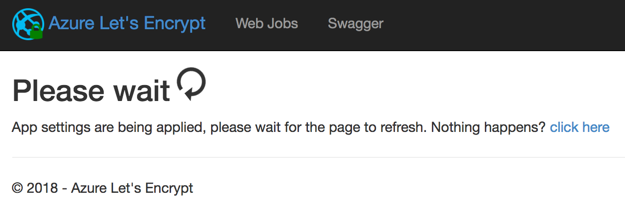
Click on Azure Let’s Encrypt, then click Browse.

Azure Extension 5

Azure Extension 6

If you didn’t restart your App Service, you might get this error below.

Azure Extension 7

Now fill out the Let’s Encrypt Authentication Settings

First you’ll enter your Tenant URL, which will be unique to your Azure tenant.

You’ll then add your Azure SubscriptionID – also unique to you.

Next, for ClientID, you’ll enter the Application ID of the Service Account / App Registration you created above. Did you copy and paste that into your secure note? If not, you can find it under Azure Active Directory > App Registrations > Name of your Service Account.

For ClientSecret, enter the Secret / Key from your Service Account / App Registration.

Enter your ResourceGroupName and ServicePlanResourceGroupName – which for me are the same thing.

Be sure to check Update Application Settings, as this is required for the web job that will renew the certificate later.

Azure Extension 8

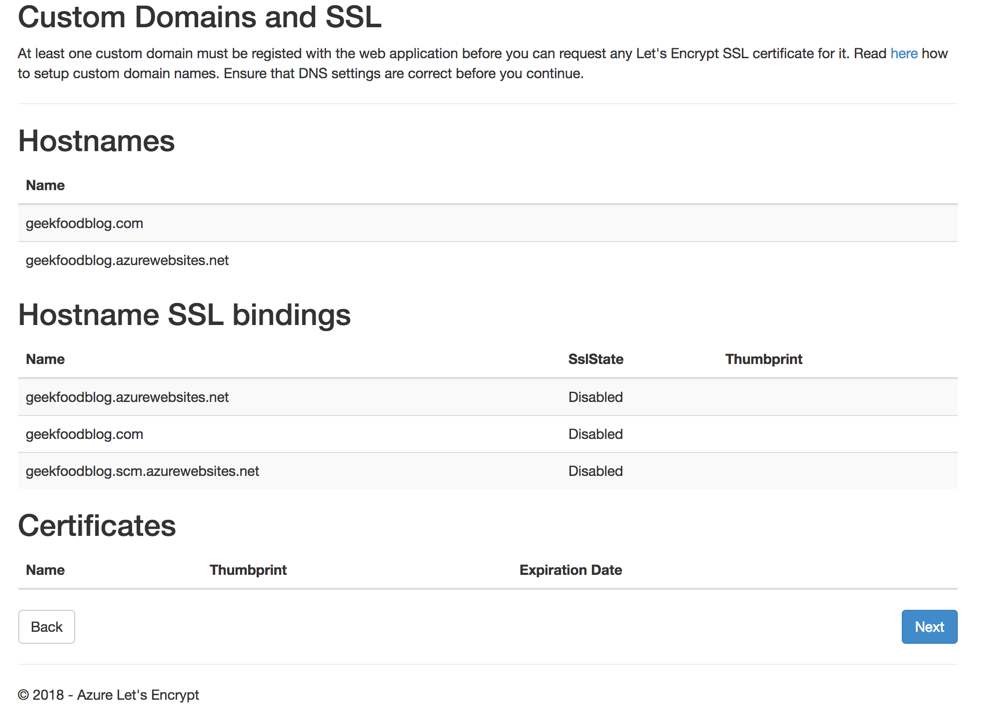
At this point, assuming you already have your hostnames configured, you should see something similar to what I did below. So click Next.

Azure Extension 9 Azure Extension 10

Select the hostname, enter your email address, and click Request and Install certificate. 

I’d already done this once before, so I was fairly sure it would work, so I didn’t bother checking the UseStaging box.

Azure Extension 11

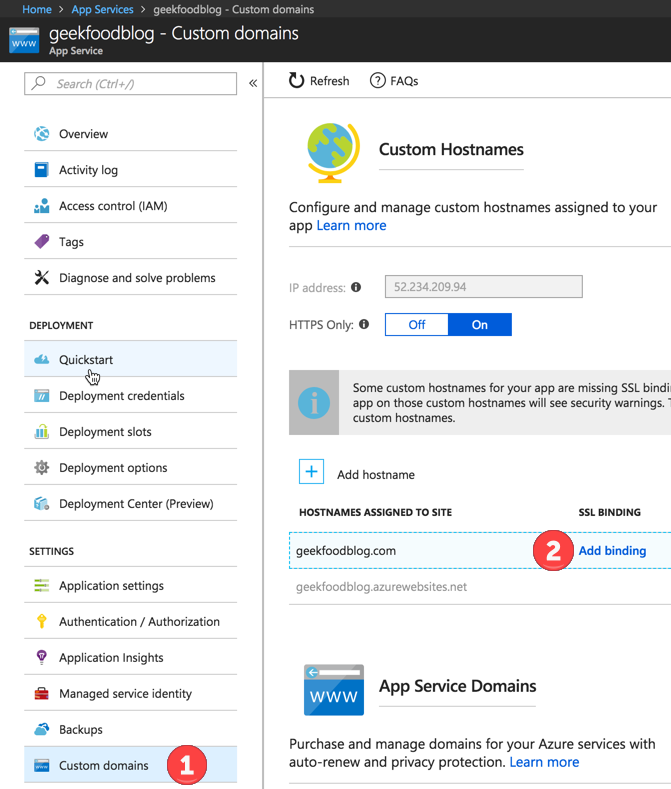
Now you’ll need to add the SSL binding to your Azure-hosted domain. So go to App Services Your App ServiceCustom Domains.

While you’re here, if you haven’t already done it, switch HTTPS Only to On.

Scroll down and click Add binding next to your domain

Azure Extension 12

Select your custom domain under Hostname. Select the new SSL certificate under Certificate. Click Add Binding.

Azure Extension 13

Time for some Azure WebJobs goodness

If you stopped right now, your site would be secured until the Let’s Encrypt SSL certificate expired in 3 months. Let’s ensure that doesn’t happen by connecting your Let’s Encrypt WebJob to the Azure Storage Account you created above.

Go to App Services Your App ServiceApplication Settings.

Scroll down to Connection Strings and create AzureWebJobsDashboard and AzureWebJobsStorage.

Both of these should have a value of, you guessed it, the Connection String you copied from your Azure Storage Account above.

Azure Extension 14

You can confirm your WebJob is running by going to App Services Your App ServiceWebJobs

Azure Extension 15

And once you’ve done all this, fire up your web browser, go to your custom domain, and check your your shiny new Let’s Encrypt SSL certificate.

Azure Extension 16

WordPress as an App Service on Azure

I’ve blogged on the WordPress platform for years, starting way, way back when I had what I thought of at the time as a shell account at Pair Networks. Since then I’ve installed and run WordPress on other web-hosting accounts, as well as on virtual private servers and, for a short period of time, even on a spare Linux box under the desk in my office. I’ve spent most of my career doing Windows system administration and a goodly bit of it using a Mac as my primary desktop/laptop computer, but I learned just enough Linux to install and keep Apache, PHP, MySQL, and WordPress running. At some point I grew tired of caring and feeding for WordPress itself, so I just imported my blogs into WordPress.com, paid for domain mapping and their “no ads” service, and let the folks at Automattic worry about it.

Will This Be Hard? No.

My first thought about running WordPress on Azure was that I would rather not go back to managing WordPress the old fashioned way involving managing the entire stack from the OS (Linux or Windows) on up. Turns out, as Jeramiah alluded to in his recent post, I don’t have to. There’s certainly more opportunity (and need, especially since I wanted to make my Azure-hosted blog secure) to fiddle with nerd knobs running an Azure App Service, but when it comes to getting WordPress up and running, it took about the same amount of time on Azure as it did at WordPress.com. Want to see how easy it was? Let’s build another one together.

1. Log into the Azure Portal and click on App Services, then click Add.

0718 Azure Add App Service

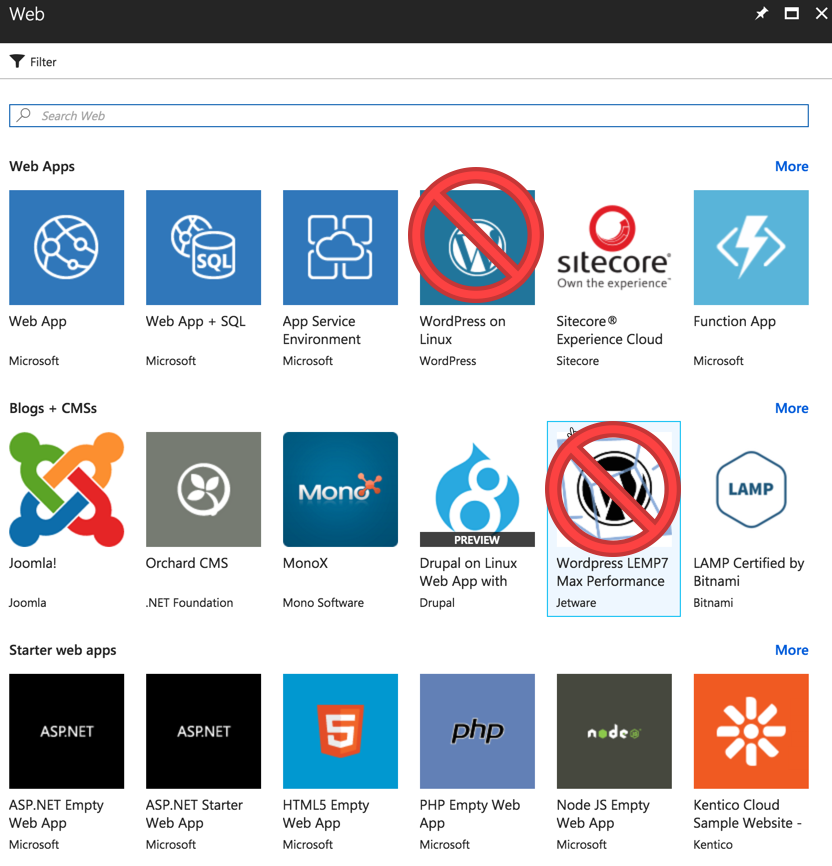
2. You may be tempted to select one of the WordPress options you see right away. Resist that urge, unless of course you want to run WordPress on Linux or something else.

0718 Azure App Service Search

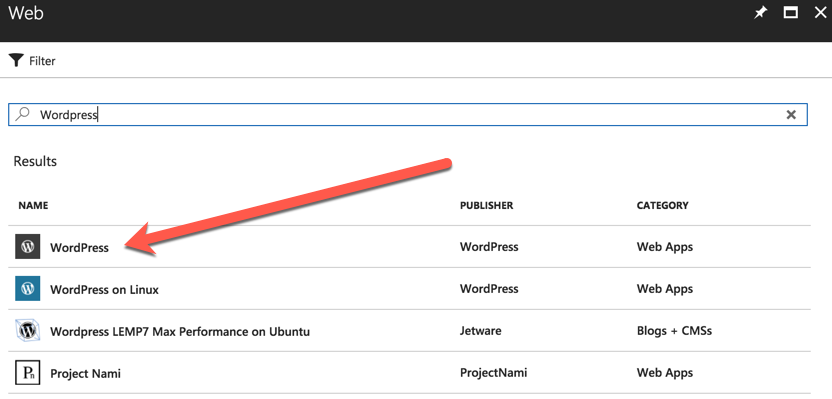
3. Instead, type WordPress into the search and hit enter. Select just plain WordPress as shown below, then click Create.

0718 Azure Just Plain WordPress

4. This next step is important for a few reasons. First, whatever App name you choose here will become your hostname in the domain azurewebsites.net. Second, you will choose whether to create a new resource group or (if you have one), use an existing one. Most importantly, and it may not be obvious at this step (it wasn’t to me), you’re choosing whether you want to run and pay for a separate database service to run MySQL. I went that route at first, but after conferring with Jeramiah, I decided I’d rather save the money/credit and just run MySQL inside the App Service plan. I’ve included the disclaimer Azure shows you below as well.

Azure App Service Options0718 Azure DB Disclaimer

5. Click Create. I chose to pin my new App Service to my dashboard.

So five steps (maybe a couple more total clicks) to deploy. It takes Azure a minute or two to deploy the new App Service, and once it’s finished, it is fully live, as shown here:

Azure WordPress Setup

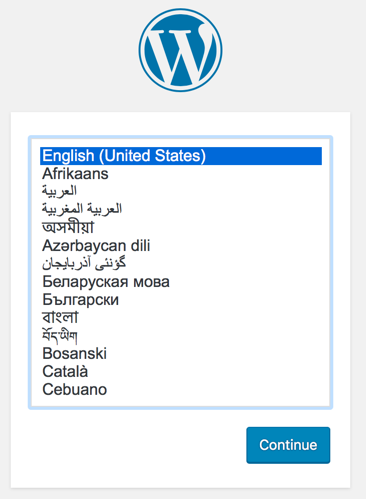
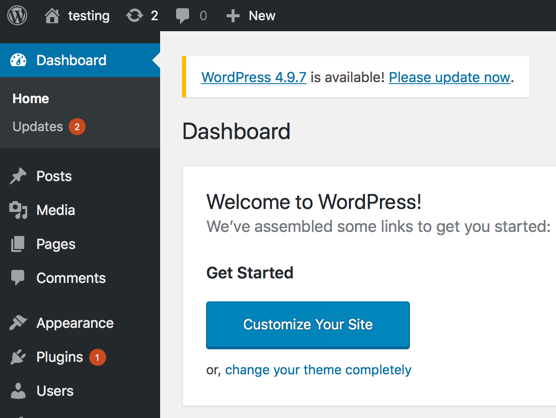
And just a minute or two after filling out the basic info for the WordPress Setup, I had a working install up and running, and even prompting me to update to the latest version.

Azure New WordPress

Back in the Azure Portal, I was presented with a nice data-rich view of my new App Service, along with lots of options, some of which I’ll go into when I detail how I used Let’s Encrypt to secure my new Azure blog.

Azure App Service Dashboard


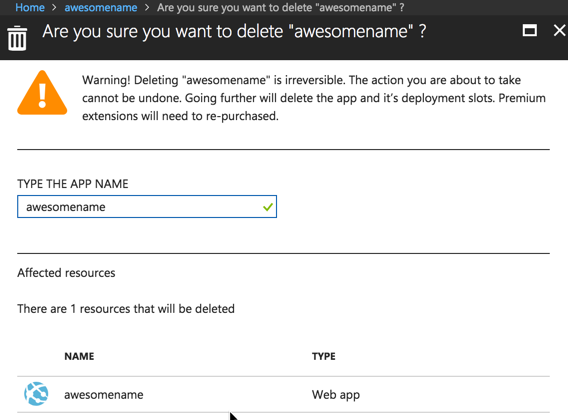
And once I finished taking the screenshots I needed for this post, deleting the App Service was just as easy as creating it. Just click Delete, confirm by typing the App Service name, and click Delete again.


Azure Delete App Service

So Why Do This?

That’s a fair question. As I mentioned in my previous post, this blog was being neglected over at WordPress.com, but I could have simply fired up MarsEdit and kept posting to it there. But I want to learn more about Microsoft Azure, maybe get outside my comfort zone a little bit, and I figure one way to encourage me to do that is to port this blog over and set myself a challenge to document the experience. So that’s what I’m doing.

If I didn’t have an MSDN subscription with a monthly Azure credit, would I pay to host my blog here full time? I don’t know – maybe, maybe not. But I do, so I am. I figure hosting my blog is the least interesting thing I can do in Azure, but it’s a start.

If you have suggestions for other stuff I can try in Azure, let me know via Twitter, where I’m @mikestanley