
Cloud Rewind at Cloud Field Day 23: Resilience as Code, Without the Ritual

At Cloud Field Day 23, I sat in on Commvault’s presentation of their Cloud Rewind solution—formerly Appranix—and I’ll admit, I came in skeptical. I’ve been doing ops and architecture work for nearly three decades, and I’ve seen a lot of “reinvented” DR solutions that promise to reduce downtime, complexity, and cost. But most of them just swap one kind of management overhead for another.

Cloud Rewind felt different. Not just because of the marketing (though there was plenty of that), but because the architecture—and the intent behind it—actually addressed some very real problems I’ve experienced firsthand.

Rethinking DR for the Cloud-Native World

The central problem Commvault tackled here is that most cloud environments today are too dynamic, too distributed, and frankly, too chaotic for traditional DR approaches to keep up. The Commvault team walked through a production AWS deployment spanning multiple availability zones, with a massive sprawl of RDS instances, load balancers, and ephemeral services—exactly the kind of complexity that keeps cloud architects up at night.

In environments like that, idle recovery setups—the standard disaster recovery standby—aren’t just wasteful. They drift. They rot. And in a ransomware event, they’re often just as compromised as production. The Commvault team flat-out said it: “Idle recovery environments drift away from production.” That alone should make any ops lead pause.

Cloud Rewind’s answer is to automate recovery from the inside out. Think of it as recovery-as-code, with snapshots of not just data, but also configurations, infrastructure dependencies, and policies. It’s not Terraform (though they integrate with it), and it’s not just backup—it’s a “cloud time machine” that builds you a clean room environment from known-good states and then lets you decide how, when, and where to cut back over to production.

They call this approach “Recovery Escort”—an odd name, honestly, but a great idea. Instead of juggling team-specific runbooks in the middle of a crisis, Cloud Rewind creates a single, orchestrated, infrastructure-as-code-based recovery plan. One workflow. One click. Done. And it’s not a copy-paste of yesterday’s environment—it uses continuous discovery to track configuration and application drift so you’re always recovering to something real. That’s what impressed me most: they’re not assuming your documentation is up to date. They know it isn’t, and they’re building around that.
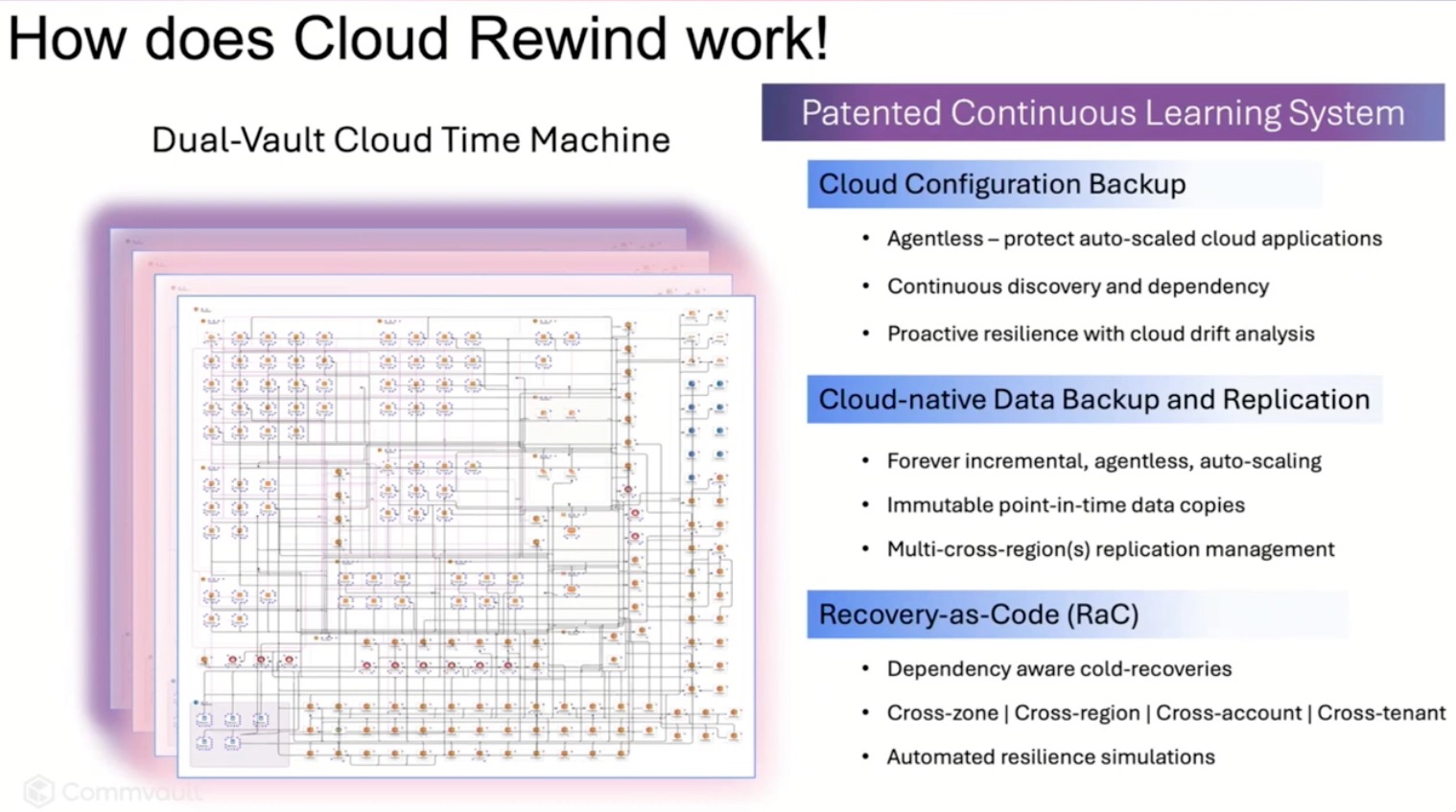
CFD CloudRewind.

Security and Simplicity in Tandem

One feature that stood out—especially with ransomware scenarios top of mind—was their support for what they call Cleanroom Recovery. You can spin up an isolated clone of your environment, run scans, validate app behavior, and confirm you’re not just recovering the malware along with the data. That level of forensic flexibility isn’t just a nice-to-have; it’s a practical necessity. Because the minute you cut back over, you want confidence that what you’ve recovered is actually usable—and uncompromised.

And the broader idea here is that DR shouldn’t be an awkward ritual. Most tooling assumes recovery is rare, complex, and terrifying—something you test once a year (maybe) and dread every time. But Cloud Rewind flips that: what if recovery were fast enough to test weekly? What if it were just part of your CI/CD pipeline? One customer story shared claimed recovery tests that used to take three days and dozens of people now complete in 32 minutes. If true, that’s awesome. That’s the kind of muscle memory every cloud org needs—and the only way to get there is through automation.

Final Thoughts

I’ve spent much of my career trying to protect environments that I could barely map out on a whiteboard. Cloud Rewind feels like a tool built by people who’ve lived that pain. Is it perfect? No. Does it still feel like a premium play? Sure. But if you care about recovery time, reproducibility, or even just reducing the number of sleepless nights when your phone buzzes at 2am, this is worth a serious look.

There’s a lot more under the hood than I’ve captured here—cross-region replication, policy-based orchestration, integration with AWS and Azure backup tools—but the big takeaway is this: Cloud Rewind shifts DR from a fire drill to a workflow. And that’s exactly the kind of evolution cloud resilience needs.

My one regret about this session? The delegates were so engaged, digging into details, that we ran out the clock before the live demo could be run. Tim Zonca from Commvault did offer to arrange a demo for those interested at another time. I might just take him up on that.

To watch the video of the #CFD23 presentation by Commvault on Cloud Rewind, go to the Tech Field Day’s YouTube channel.

Qumulo at Cloud Field Day 23: DR Without the Drama

I’ve been in this industry long enough to have seen disaster recovery run the full spectrum—from fire drills that barely worked to full-on game changers. And at Cloud Field Day 23, Qumulo laid out a vision for business continuity that might just live up to the hype. Not because it’s flashy, but because it’s practical. DR that works without being the most expensive line item in your budget? That got my attention.

Let’s break it down.

No More Stretching the Truth About Stretch Clusters

Most of us have been sold the dream of active-active systems with full failover and zero downtime. And then reality sets in. You either pay double to stand up a hot standby that sits idle most of the year—or you roll the dice and hope your last backup isn’t too stale when it counts.

Qumulo’s take? Don’t replicate everything twice. Instead, park your data in cold cloud storage like Glacier Instant Retrieval or Azure Blob Cold, where the cost per terabyte actually makes CFOs smile. Then, scale up compute on demand only when you need it. We’re talking cold to hot in under five minutes—no data rehydration, no DNS voodoo, no long restore windows.

Qumulo Instant Hot DR

And here’s where it gets really interesting: Qumulo isn’t just minimizing costs—they’re actively engineering out inefficiencies. One customer faced $800,000 in projected API charges moving medical images into a vendor-neutral archive. Qumulo helped them reduce that to just $180. The magic wasn’t in waving away the cost—it came from bin-packing files to minimize object write operations and optimizing how data interacted with the storage backend.

On top of that, Qumulo’s neural cache plays a significant role in controlling read-heavy workloads. By maintaining 92–98% read cache hit rates and adapting caching strategies based on usage patterns, file types, and directory behavior, they slash repeat API calls that would otherwise nickel-and-dime you into oblivion. Their global fleet averages less than 1% of monthly cost from API charges, compared to 15–20% that’s typical for cloud object storage.

Now, are those numbers a best-case scenario? Almost certainly. And I’m always skeptical of dramatic cost-saving claims until I can get hands-on and validate them in a real environment. But what’s undeniable is that Qumulo is hyper-optimizing their platform not just for performance, but to respect the economics of running file workloads in the cloud. That’s more than most vendors even try to do.

Real-Time DR You Can Actually Test (And Should)

One line from the presentation stuck with me: “We’ve never tested our DR because if I take down production to do it, that’s a resume-generating event.” If you’ve worked in ops, you’ve heard this. Or maybe you’ve said it.

Qumulo’s approach flips the model. Their system continuously replicates data block-by-block between your on-prem caching layer and a cloud-native backend. The cache stays local for performance, but the cloud holds the authoritative copy. That means you can spin down your on-prem environment, move employees to another site—or just hand them a fully capable Asus NUC—and keep working like nothing happened.

During the demo, they showed a failover that was basically “stop using this SMB share, start using this one.” Same data, same structure, same IP. Even the mount point didn’t change. No rehydration, no scrambling to resync state. It just worked.

Data Fabric That’s More Than a Buzzword

Every vendor talks about their data fabric. Qumulo actually showed one.

They connected an on-prem environment to a cloud-native Qumulo instance using a “data portal”—think block-level streaming replication, not dumb file copies. Clients didn’t have to know the cloud existed. Then they moved data, edited a file, failed over, failed back, and showed full consistency end to end. And if you’re thinking, “What about edge or third-party access?”—yep, that’s built in too. They demoed extending read-write access to an external partner with full revocation and audit.

Even better, this wasn’t just DR—it was a multi-cloud-ready setup with file, object, and cloud compute playing nice together. AWS, Azure, GCP—pick your flavor. The system doesn’t care.

Where the Data Lives (And Who Uses It)

In the CEO’s opening segment, we got a better sense of just who’s using Qumulo. Turns out, it’s everyone from entertainment studios rendering animated characters your kids know by name, to healthcare researchers storing medical imaging and genomic datasets. The claim that “we’re storing the cure for cancer on a Qumulo system” might sound dramatic—but they meant it literally, with NIH and NSF grant recipients relying on their storage to keep research data accessible and verifiable.

Want to know how real-time image processing supports public safety? Qumulo powers storage for real-time crime centers in major U.S. cities. They even shared a story about a high-profile presidential visit requiring instantaneous video ingest, analysis, and secure access for multiple agencies, including those that couldn’t legally use facial recognition software—while others could. Same data, different access paths, strict consistency guaranteed. 

They’re also serving defense agencies working with UAS/UAV video data and edge AI, and municipal governments managing CAD/GIS datasets for public works. One customer runs a single microscope generating 750 terabytes per week, streaming it to an AI cluster in Texas for medical research. That’s the scale we’re talking about.

Final Take

This wasn’t a pitch about replacing your on-prem hardware with another box. It was a strategy shift: DR that’s built into your primary system, not bolted on. Qumulo’s demo didn’t just show high availability—it showed recoverability that feels like high availability. And it did it with less infrastructure, less manual effort, and fewer “please don’t crash” prayers.

It’s business continuity without the drama. And frankly, it’s pretty cool.

Qumulo CFD23 Presenters

Here are links to the videos of the Qumulo presentation at Cloud Field Day 23 on the Tech Field Day Youtube channel:

Reimagining Data Management in a Hybrid-Cloud World with Qumulo

Seamless Business Continuity and Disaster Avoidance with Qumulo

Seamless Business Continuity and Disaster Avoidance: Multi-Cloud Demonstration Workflow with Qumulo